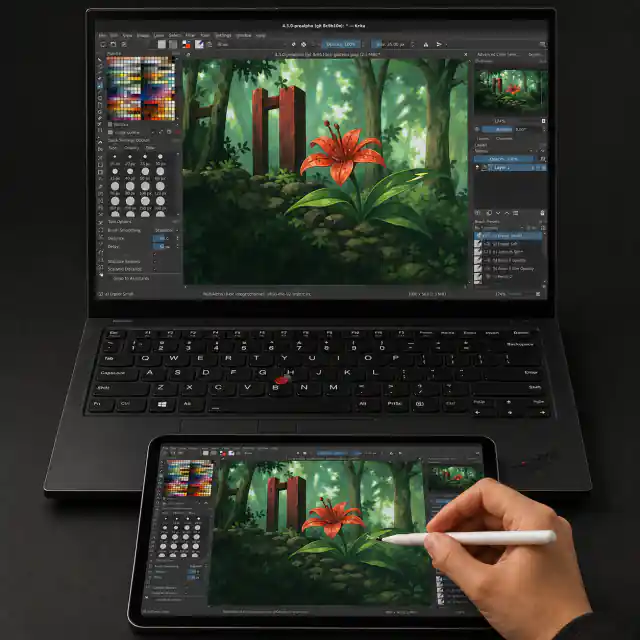
Windows 11 · local network · tested MVP

Your iPad.
Your Pencil.
Your Windows canvas.

Mirror a Windows monitor to Safari and send real pressure and tilt back as native Windows pen input. No iPad app, account, subscription, or cloud relay.

v0.3.3 portable, unsigned prerelease. Physical iPad validation is active; Apple Pencil and art-app certification is still in progress.

WINDOWSDrawing appWindows Ink / Pointer
NFIDBPrivate LAN bridgeWebRTC video + pen data
IPADSafari + PencilNo App Store install
01

Actually local

The host serves the iPad page and connects peer-to-peer on your LAN. There is no relay backend or account to create.

02

Actual pen data

Coalesced Pointer Events carry pressure and tilt into native Windows PT_PEN input. Predictions stay visual-only.

03

Evidence, not guesses

Live stats and local JSON reports capture latency, bandwidth, frame timing, loss, input continuity, pressure, angles, and percentile trends.

Three steps

Nothing to install on the iPad.

NFiDB is intentionally small. Start the Windows host, pair Safari, then draw in the Windows app you already use.

  1. 1
    Run NFiDBChoose the Windows monitor and allow Private-network access.
  2. 2
    Open the local addressUse iPad Safari and enter the renewable six-digit PIN or scan the QR. Nothing is installed on the iPad.
  3. 3
    DrawPencil input returns as native pressure and tilt; touch stays off until you enable it.

What this MVP is

A working bridge, with visible seams.

Included nowMonitor capture, fast-start H.264 WebRTC, resettable PIN/QR pairing, native pen and optional touch, full diagnostic recording/export, portable binaries, and automated 240 Hz/4K soak tests.

Still aheadMedia Foundation hardware encoding, window-only capture, signed installer, extended desktop, and physical iPad/Krita/Rebelle/Photoshop certification.

Read the exact test matrix →