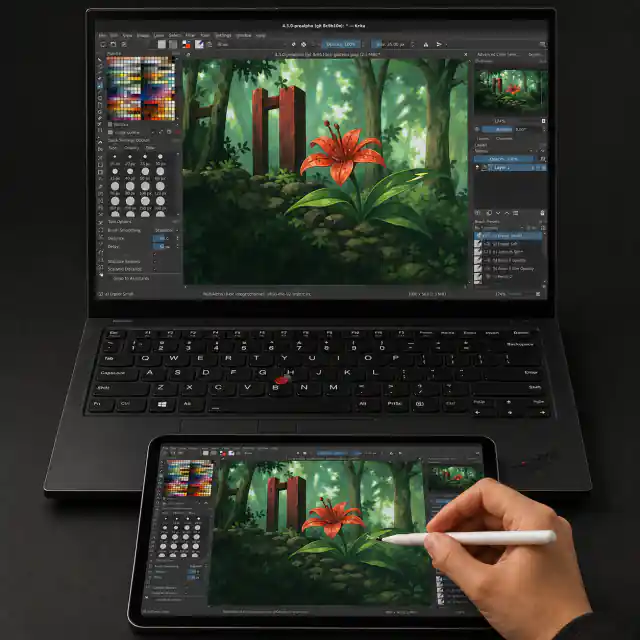
Your iPad.
Your Pencil.
Your Windows canvas.

See your Windows screen on your iPad and draw in your favorite desktop apps with Apple Pencil pressure and tilt. No iPad app, account, subscription, or cloud service.

v0.3.4 · Portable for Windows 11 x64.

WINDOWSYour drawing appRebelle, Krita, and more
NFIDBPrivate connectionNo account or cloud required
IPADSafari + PencilNothing to install
01

Actually local

Your PC and iPad talk directly. There is no account, cloud service, or internet connection involved in a drawing session.

02

Your Pencil still feels like one

Pressure and tilt reach your Windows drawing app, so you can work with the tools and brushes you already know.

03

Nothing extra to carry

Open Safari on the iPad you already own and leave the separate graphics tablet—and another subscription—at home.

Three steps

Nothing to install on the iPad.

Start NFiDB on Windows, connect with Safari, then draw in the app you already use.

  1. 1
    Run NFiDBChoose the Windows screen you want to use.
  2. 2
    Connect your iPadOpen Safari and scan the QR code or enter the six-digit PIN.
  3. 3
    DrawPick up your Pencil and get back to the app you already love.

Technical details

Under the hood.

The short version: your Windows PC does the work and your iPad connects directly to it.

01

Local video

NFiDB serves the iPad page from the Windows host and sends H.264 video over a direct WebRTC connection. No cloud relay is involved.

02

Native pen input

Safari Pointer Events carry pressure and tilt back to Windows as native PT_PEN input. Predicted events remain visual-only.

03

Local diagnostics

Live stats and optional JSON reports cover latency, frame timing, bandwidth, input continuity, pressure, and tilt without sending data elsewhere.